要在 Google Vertex AI (Google Cloud 的一项服务,不是 Google AI Studio) 使用 Claude 模型(其它的模型也是这么用,但是 Gemini 直接去 Google AI Studio 申请 API 密钥也够用),正式的做法是创建服务账户和用 Vertex AI SDK,但是酒馆显然并不支持这些。
通过一个名为 oai-reverse-proxy 的反向代理,可以把 Vertex AI 的 API 调用转换为 OpenAI 兼容的格式,从而让酒馆可以使用。
Preface
- 不是宝宝辅食,所以看不懂请划走。
- 如果你要通过酒馆用 Gemini 模型,那你需要做的不是看这个教程,而是去 Google AI Studio 申请 API 密钥,然后把获得的 API 密钥填进 酒馆的 MakerSuite API 密钥里面。
- 你需要自己有一个已启用 Vertex AI 和 Claude 模型的 Google Cloud 项目,不要想着嫖别人的。
- 你需要自行解决反向代理本身如何连接到 Google Cloud 的问题,包括但不限于国家级防火墙,Vertex AI 和 Claude 不支持的区域等等
- 不要直接把这玩意扔到公网上,除非你很有钱。 但是如果你有足够的智慧设置像是 Cloudflare Tunnel 一类的隧道,或者是看好配置文件设置好 ACL,
那大概你也用不上我给你写教程。 - 小心保管你下载的服务账户私钥文件,和 oai-reverse-proxy 的配置文件。除非你人美心善不怕自己账单爆炸。
Requirements
- 一个已启用 Vertex AI 和 Claude 模型的 Google Cloud 项目。
按照 Google Cloud 的文档,把「准备工作」那一步做完。: Anthropic 的 Claude 模型 | Generative AI on Vertex AI | Google Cloud Documentation
- 创建一个服务帐号,并授予访问前述项目和使用 Claude 模型的权限。(Consumer Procurement Entitlement Manager Identity and Access Management 和 Vertex AI User 角色),并下载相应的凭据。
相关的 Google Cloud 文档。
配置 oai-reverse-proxy
- knanon 的原版和 cg-dot 的 fork 选一个用即可。下面以 cg-dot 的仓库为例。
- 以及 docs/gcp-configuration.md 介绍了该怎么设置 Google Cloud 的服务账户, .env.example 介绍了配置文件该怎么写。
- 如果你有足够的智慧成功运行起酒馆,那大概你已经装好 Node.js 和 Git 了,这里就不赘述怎么装了。
# 克隆仓库
$ git clone https://github.com/cg-dot/oai-reverse-proxy
$ cd oai-reverse-proxy
$ cp .env.example .env
# 用你爱用的编辑器打开从示例文件复制过来的 .env 文件
$ $EDITOR .env
你下载到的服务账户密钥 JSON 文件大约会是这个样子:
你看到的 private_key 不会那么短,我也没智商下线到直接把私钥贴给你。
{
  "type": "service_account",
  "project_id": "vertexsandbox-114514",
  "private_key_id": "abcdef123456",
  "private_key": "-----BEGIN PRIVATE KEY-----\nabcdef19890604fedcba-----END PRIVATE KEY-----\n",
  "client_email": "oai-reverse-proxy@vertexsandbox-114514.iam.gserviceaccount.com",
  "client_id": "123456",
  "auth_uri": "https://accounts.google.com/o/oauth2/auth",
  "token_uri": "https://oauth2.googleapis.com/token",
  "auth_provider_x509_cert_url": "https://www.googleapis.com/oauth2/v1/certs",
  "client_x509_cert_url": "https://www.googleapis.com/robot/v1/metadata/x509/oai-reverse-proxy%40vertexsandbox-114514.iam.gserviceaccount.com",
  "universe_domain": "googleapis.com"
}
你在 .env 里设置的 GCP_CREDENTIALS 环境变量应该如下所示。
GCP_CREDENTIALS=<项目ID>:<服务帐号电子邮件地址>:<Google Cloud 区域,推荐 us-east5>:<私钥文本>
例如上面的例子对应的结果会是
GCP_CREDENTIALS=vertexsandbox-114514:oai-reverse-proxy@vertexsandbox-114514.iam.gserviceaccount.com:us-east5:-----BEGIN PRIVATE KEY-----\nabcdef19890604fedcba-----END PRIVATE KEY-----
如果你没有从另外一台设备连接的需求,那同时建议只监听本地地址。
# The port and network interface to listen on.
PORT=7860
BIND_ADDRESS=127.0.0.1
然后安装依赖启动服务。
$ npm install
$ npm run start:dev
加入一切正常的话,你应该可以打开配置文件设置的地址和端口(默认是 http://localhost:7860 ),查看反向代理的运行状态。
{
  "uptime": 28,
  "endpoints": {
    "gcp": "http://localhost:7860/proxy/gcp/claude"
  },
  "proompts": 0,
  "tookens": "0",
  "proomptersNow": 0,
  "gcpKeys": 1,
  "gcp-claude": {
    "usage": "0 tokens",
    "activeKeys": 1,
    "revokedKeys": 0,
    "sonnetKeys": 0,
    "sonnet35Keys": 1,
    "haikuKeys": 0,
    "proomptersInQueue": 0,
    "estimatedQueueTime": "no wait"
  },
...
配置酒馆使用反向代理
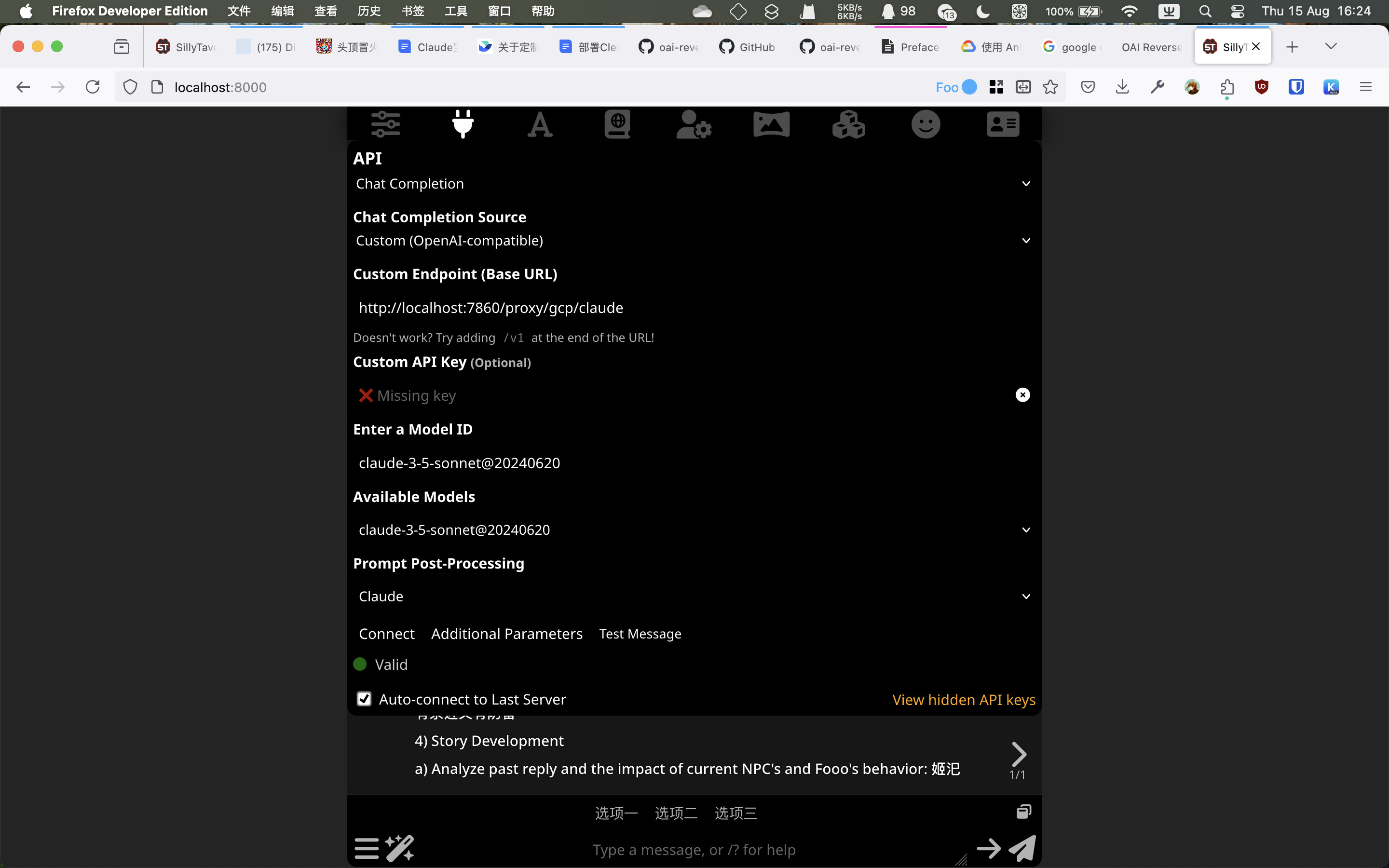
- API 类型选择“自定义(兼容 OpenAI)
- 自定义终结点填入反向代理页面那个 JSON 里
endpoints.gcp的值,例如http://localhost:7860/proxy/gcp/claude。 - 提示词后处理选 Claude。
- 假如配置正确,你点击‘连接’的时候,可用模型会显示相应的 Claude 模型。但是测试连接总会成功(oai-reverse-proxy 会在检测到发送的消息是测试消息时不请求API而是直接返回成功),所以最好是直接开始一条对话测试。